

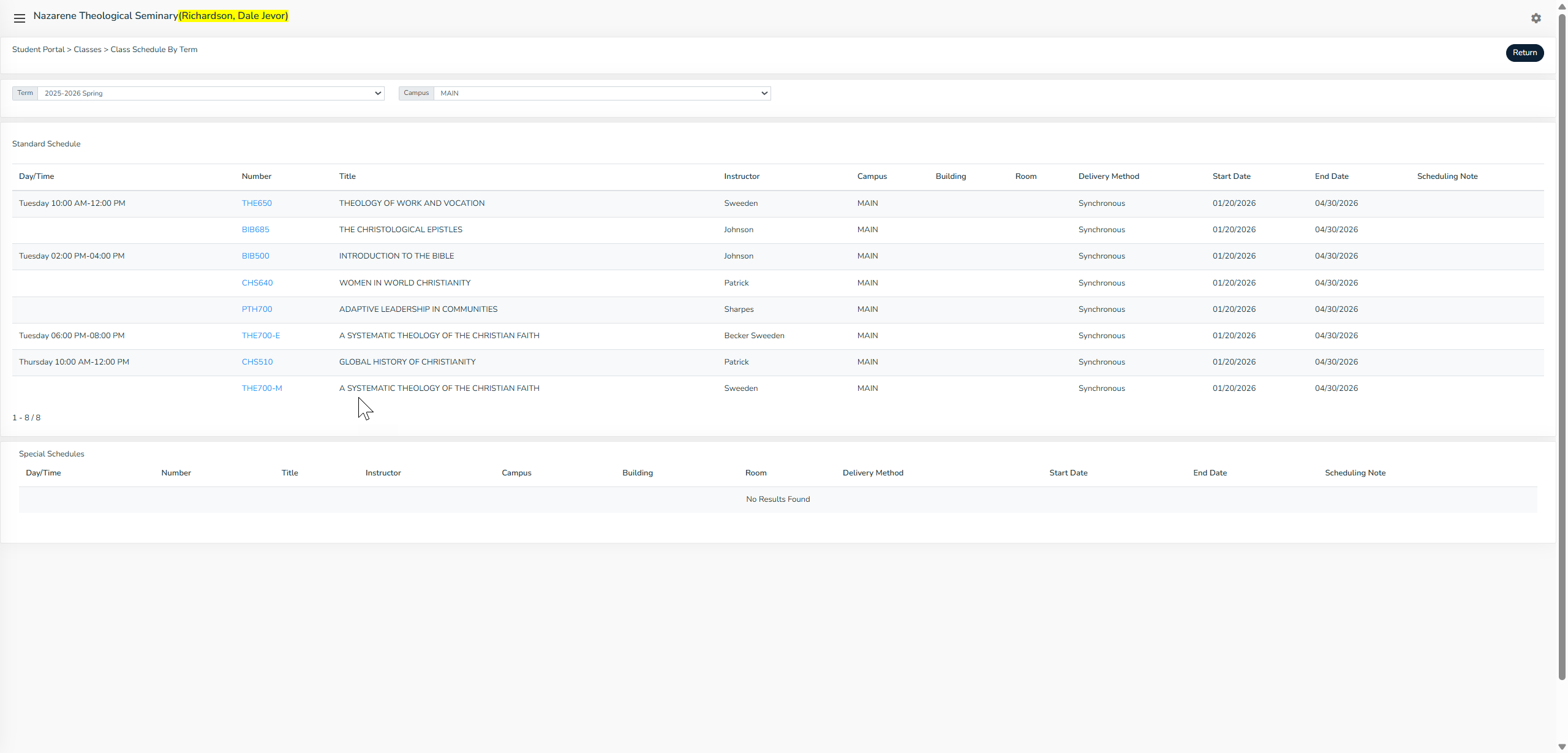
I have had some students ending up on "Class Schedule by Term" under their Classes section and they have been really confused about how this page functions. It doesn't show the days and times in each column, only in the first one. It also doesn't list any classes without days and times and that has made students think that the classes that are asynchronous aren't being offered. I understand the reason this exists, but I was wondering if it can be hidden from NTS students so they aren't confused or if we can make changes to help them see all classes, just sorted by day and time, possibly with asynchronous classes at the bottom?
Status:
Answered
Dear Britanny,
I just sent your message to the developers.
Thanks for reaching us.
Priscila
GNECsis Spanish and Portuguese Support Specialist
Hello,
The classes by Schedule only shows classes that have been assigned a schedule.
The registration by schedule also only shows classes with a schedule.
I already showed you how you can turn these off if you do not want to use them.
My recommendation however is to have a schedule for each class. The classes that are open ended (asynchronous classes ) can be clumped together in the schedule of Open ended (asynchronous classes ). Meaning create a schedule of asynchronous classes. Thus all classes will be assigned their respective schedule and the List of classes by Schedule will then show all classes.
The schedule indent confusion is not being changed at the moment but hopefully it will be clearer when all classes have a schedule.
Dana
*GNECsis Support Specialist*